> For the complete documentation index, see [llms.txt](https://www.tvrename.com/llms.txt). Markdown versions of documentation pages are available by appending `.md` to page URLs; this page is available as [Markdown](https://www.tvrename.com/help-and-support/troubleshooting.md).
# Troubleshooting
Some common problems (and their solutions)
### Errors after installing -> Check dependencies
1. Install TV Rename
2. Should install .net10 Desktop Runtime itself
1. If not
3. Visual C++ 2022 [Redistributable ](https://learn.microsoft.com/en-us/cpp/windows/latest-supported-vc-redist?view=msvc-170#visual-studio-2015-2017-2019-and-2022)(or newer)
{% hint style="info" %}
Help > Browser Test will verify that all C++ dependencies are found
{% endhint %}
### Issues with out of date show information -> Repair Corrupt Data
Occasionally information for shows gets corrupted and needs refreshing. The quickest way to do this is a “Forced Refresh”, which comes in two flavours.
#### Refresh Show
Firstly, if the problem is small, only effecting a small number of shows, right clicking a problematic show on the ***My Shows*** tab will pop up a menu on which one of the options is “Force Refresh”. Clicking this option will tell TV Rename to go to [The TVDB](http://thetvdb.com/) and re-collect all the data available for that show and re-populate the local cache. This will often fix the issue.
The second solution is far more drastic in its effect.
#### Force Refresh All
“Force Refresh All” in the **Tools** menu is the “Tool of Last Resort”. If TV Rename’s representation of your media library is a real mess or the previous solution doesn’t help then this is your only real alternative.
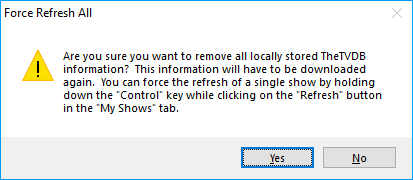
After selecting the option from the menu you are presented with the alert window (shown).
**READ IT CAREFULLY AND PAY ATTENTION**. If you click `Yes` there’s no going back, all the locally stored information in TheTVDB’s cache will be **DELETED**.
The ***My Shows*** tab reverts to showing The TVDB codes instead of show names, indicating that the relevant data has been deleted. Whilst still on the ***My Shows*** tab click the `Refresh` button and the show data will be downloaded again. (Now might be a good time for a coffee, if your library is large and internet connection slow it may take a while!)
Once the download is complete all your shows will re-appear by name.